

Buy Shadowsocks Account | Secure Private Network Access
Price range: $29.00 through $499.00 & Available Now – Delivered Instantly
Looking for an easy way to browse the internet securely? A Shadowsocks account might be just what you need. It’s a simple tool that helps keep your online activities private and gives you flexible access to websites and services.
Here’s what you get:
-
Instant access — your account is ready to use right after purchase.
-
Secure checkout — no worries about your payment info.
-
Reliable service — it works smoothly when you need it.
-
Helpful support — friendly people ready to assist you.
Think of Shadowsocks like a lightweight shield for your online connection. It’s great whether you’re just surfing the web or need a simple way to connect securely.
One thing to keep in mind: always use the service responsibly. Follow the rules, laws, and terms set by your provider.
I’ve found that picking a trusted provider makes everything easier. No hassle, no surprises. Just sign up, connect, and enjoy a safer online experience.
Ready to get started? Grab your Shadowsocks account today and browse with confidence.
- Satisfaction Guaranteed
- No Hassle Refunds
- Secure Payments
Description
Are you looking for a simple way to protect your online privacy and access content without restrictions? Buying a Shadowsocks account could be the solution you need.
With a Shadowsocks account, you get a fast and secure connection that keeps your data safe from prying eyes. Imagine browsing freely, streaming your favorite shows, or working remotely without worrying about censorship or slow speeds. Keep reading to discover how a Shadowsocks account can change the way you use the internet and why it might be the best choice for you right now.
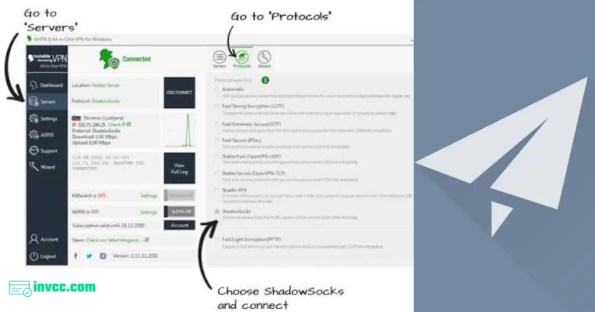
What Is Shadowsocks
Shadowsocks is a secure proxy tool that helps you browse the internet privately. Buying a Shadowsocks account gives you fast and safe access to blocked websites. It works well on many devices and keeps your connection hidden.
What Is Shadowsocks?
Shadowsocks is a secure proxy tool designed to protect your internet privacy. It helps you bypass internet restrictions and censorship. Many people use Shadowsocks to access websites that may be blocked in their region.
This tool creates an encrypted connection between your device and the internet. This encryption hides your online activity from others, including your internet service provider.
Shadowsocks works differently from traditional VPNs. It focuses on speed and simplicity. This makes it a popular choice for users who want fast and reliable access.
Shadowsocks uses a client-server model. You connect your device to a Shadowsocks server. The server then sends your internet requests securely to the websites you want to visit.
The connection is encrypted, which means no one can easily see what you are doing online. This protects your data from hackers and trackers.
The tool uses a special protocol to avoid detection by internet filters. This helps users access content without interruption.
Shadowsocks offers fast internet speeds. It does not slow down your connection like some VPNs might. This is important for streaming videos or downloading files.
The tool is easy to set up and use. It works well on many devices, including computers and smartphones. Users appreciate its lightweight design and strong security.
Shadowsocks also helps keep your personal information safe. It stops others from spying on your online activity.
Benefits Of Using Shadowsocks
Using a Shadowsocks account offers many advantages for internet users. This tool helps protect your data and lets you access more content online. Shadowsocks is popular for its simplicity and strong performance. It makes your online experience safer and more flexible.
Here are some key benefits of using Shadowsocks.
Enhanced Privacy And Security
Shadowsocks encrypts your internet traffic. It hides your data from hackers and spies. This keeps your online activities private. It works well on public Wi-Fi networks. Your passwords and messages stay safe from theft. Shadowsocks prevents websites from tracking you easily.
Bypass Geo-restrictions
Some websites block users from certain countries. Shadowsocks helps you avoid these blocks. It changes your IP address to a different location. You can access videos, news, and services from anywhere. No more missing out on content due to your region.
Improved Internet Speed
Shadowsocks uses lightweight technology. It avoids slowing down your connection. Many VPNs reduce internet speed, but Shadowsocks keeps it fast. This makes streaming and browsing smoother. You get better performance without lag or buffering.
How Shadowsocks Works
Shadowsocks is a tool that helps users access the internet more freely and securely. It works by creating a secure connection between your device and the internet. This connection hides your real location and protects your data from being seen by others. Understanding how Shadowsocks works can help you use it better and stay safe online.
Proxy Technology Basics
Shadowsocks works as a proxy. A proxy acts like a middleman between your device and the internet. Instead of connecting directly to websites, your data goes through the proxy server first. This changes your IP address and makes it harder to track your online activities. The proxy server also helps bypass internet restrictions and filters.
Encryption Methods
Shadowsocks uses strong encryption to protect your data. Encryption changes your data into a secret code. Only the Shadowsocks server can decode this code. This keeps your information safe from hackers and spies. Different encryption methods are available, but all aim to keep your data private and secure.
Connection Setup
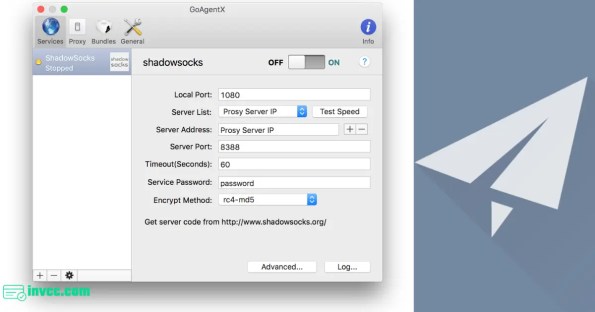
To use Shadowsocks, you need to set up a connection between your device and the server. First, you enter the server address and port number. Then, you add a password and choose an encryption method. After setup, your device connects to the Shadowsocks server. All your internet traffic passes through this secure tunnel.
Choosing The Right Shadowsocks Account
Choosing the right Shadowsocks account is important for a smooth and secure internet experience. Different accounts offer various features and options. Picking the best one depends on your needs and usage.
Server Locations
Server locations affect your connection speed and access to content. Choose an account with servers near your area. More locations mean better chances to bypass restrictions. Consider countries where you want to access websites or services.
Bandwidth And Speed Limits
Bandwidth controls how much data you can use each month. Speed limits affect how fast your connection will be. Look for accounts with enough bandwidth to avoid slowdowns. Higher speed limits improve streaming and browsing quality.
Subscription Plans
Subscription plans vary by duration and price. Monthly plans offer flexibility but can be costlier. Longer plans save money over time but need commitment. Check if the plan includes automatic renewal or cancellation options.
Where To Buy Shadowsocks Accounts
Finding a good place to buy Shadowsocks accounts is important. These accounts help you browse the internet safely and without limits. Many sellers offer different features, prices, and support levels.
Choosing the right provider can save money and improve your experience. Here is a guide to help you find trusted sellers, compare prices, and check their customer support.
Trusted Providers
Trust is key when buying Shadowsocks accounts. Look for providers with good reviews and a strong reputation. Avoid unknown sellers with little feedback. Check forums and tech communities for recommendations. Reliable providers offer secure connections and stable servers.
Pricing Comparison
Prices vary widely for Shadowsocks accounts. Some sellers charge a low monthly fee, while others have higher costs with better service. Compare prices carefully. Look for clear pricing without hidden fees. Cheap accounts may have slow speeds or poor support.
Customer Support
Good customer support matters. Sellers should respond quickly to questions and problems. Check if support is available 24/7 or during certain hours. Read reviews to see how well providers handle issues. Reliable support helps solve connection problems fast.
Setting Up Your Shadowsocks Account
Setting up your Shadowsocks account is the first step to enjoying fast and secure internet. The process is simple and quick, even for beginners. Follow a few easy steps to install and configure your account properly. This guide will help you get connected without hassle.
Shadowsocks Account Pricing
| Product Name | Account Type / History | Price (USD) | Benefits |
|---|---|---|---|
| Shadowsocks Account | New Account | $29 | Great if you want a solid start. It gives you encrypted network access and lets you browse freely. |
| Shadowsocks Account | 3 Months Aged Account | $67 | A bit older, with some history behind it. Perfect if you want something tried and true for your online needs. |
| Shadowsocks Account | 6 Months Aged Account | $119 | Looking for something more established? This account has been around longer, so it’s ready for steady use. |
| Shadowsocks Account | 12 Months Aged Account | $199 | This one’s got a full year behind it. If you need a reliable, long-term option, it’s a solid pick. |
| Shadowsocks Premium Account | New Premium Subscription | $299 | For those who want more features and better options. A fresh premium account ready to go. |
| Shadowsocks Premium Account | 12 Months Premium Subscription | $499 | Premium service that lasts a full year. Ideal if you want top features without worry. |
Installation Steps
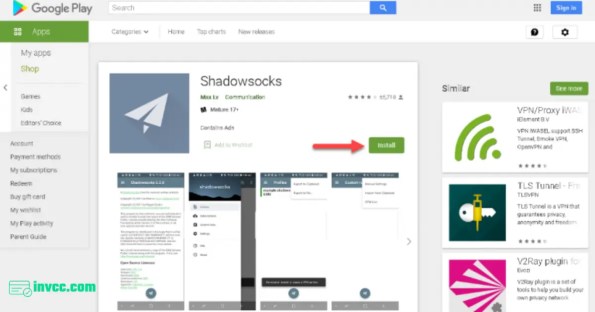
Start by downloading the Shadowsocks client. Choose the version that matches your device. Open the installer and follow the on-screen instructions. After installation, launch the app to begin setup. Enter the server address and port number given by your provider. Input your password and select the encryption method. Save the settings and connect to the server. The app will show a successful connection once done.
Configuration Tips
Use a strong password for better security. Select an encryption method supported by your server. Keep the port number the same as provided. Enable the “auto-start” option for easy access. Check your device’s firewall to allow Shadowsocks traffic. Test your connection speed to ensure smooth browsing. Adjust settings if you notice any slowdowns. Regularly update the app for the latest features and fixes.
Troubleshooting Common Issues
Check your internet connection if Shadowsocks does not connect. Verify the server address and port are correct. Confirm your password is entered accurately. Restart the Shadowsocks app and try again. Disable any VPN or proxy that may interfere. Look for app updates that fix bugs. If problems persist, contact your provider’s support team. Keep calm and try these steps one by one.
Security Tips For Shadowsocks Users
Using Shadowsocks adds a layer of privacy to your online activities. Keeping your connection secure protects your data from hackers and spies. Follow simple security tips to stay safe while using Shadowsocks.
Regular Password Updates
Change your Shadowsocks password often. This reduces the chance of someone guessing or stealing it. Use strong passwords with letters, numbers, and symbols. Avoid common words or easy patterns.
Avoiding Suspicious Servers
Choose trusted Shadowsocks servers only. Suspicious servers may track your data or inject malware. Use servers recommended by reliable sources. Check reviews or user feedback before connecting.
Combining With Other Security Tools
Use Shadowsocks alongside a good antivirus and firewall. These tools block harmful attacks and protect your device. Consider using a VPN for extra privacy when needed. Layering security tools keeps your information safer.
Alternatives To Shadowsocks
Shadowsocks is popular for bypassing internet restrictions. Still, many users want different options for privacy and speed. Several alternatives offer unique features and can fit various needs. Exploring these choices helps find the best tool for safe browsing.
Each option differs in setup, security, and cost. Learning about alternatives makes it easier to pick the right one. Here are some common options besides Shadowsocks.
Vpn Services
VPNs create a secure tunnel for your internet traffic. They hide your IP address and encrypt data. Many VPNs offer apps for easy use on phones and computers. Some providers have many server locations worldwide. VPNs work well for privacy and accessing restricted content. They often include extra features like kill switches and ad blockers. VPNs can slow down your connection a bit due to encryption. Prices vary from free to monthly subscriptions.
Other Proxy Solutions
Proxies route your traffic through a different server to hide your IP. They usually work on specific apps or browsers. HTTP and SOCKS5 proxies are common choices. Proxies are simpler than VPNs but offer less security. They do not always encrypt your data. Some proxies are free, but paid ones offer better speed and reliability. Proxies can unblock sites but may not protect your entire device.
Comparing Features And Costs
VPNs provide strong encryption and device-wide protection. They cost more but offer better security. Proxies are cheaper or free but less secure. Shadowsocks is lightweight and fast but needs manual setup. VPNs are easier for beginners to use. Proxies suit users with basic needs or specific apps. Consider your budget, security needs, and ease of use. Choose the tool that fits your online habits best.
Frequently Asked Questions
What Is A Shadowsocks Account Used For?
A Shadowsocks account provides secure, private internet access. It bypasses geo-restrictions and censorship. This helps users surf anonymously and safely.
How Do I Buy A Shadowsocks Account Securely?
Purchase from reputable providers with positive reviews. Use secure payment methods like PayPal or credit cards. Verify the provider’s refund and privacy policies before buying.
Can Shadowsocks Improve My Internet Speed?
Yes, Shadowsocks can optimize your connection by bypassing throttling. It routes traffic efficiently, often resulting in faster browsing and streaming speeds.
Is Shadowsocks Legal To Use Worldwide?
Shadowsocks is legal in many countries, but some restrict VPN use. Always check local laws before using it to avoid legal issues.
Conclusion
Choosing a Shadowsocks account helps protect your online privacy. It keeps your internet traffic safe from spying. You can access websites without restrictions. The setup is usually quick and easy. This tool works well for many devices. Enjoy a smoother, safer browsing experience today.
Stay secure and browse with confidence. Shadowsocks offers a reliable way to keep your data private. Simple, effective, and user-friendly. A smart choice for online security.
Additional information
| Select | Shadowsocks Account — New Account — $29, Shadowsocks Account — 3 Months Aged Account — $67, Shadowsocks Account — 6 Months Aged Account — $119, Shadowsocks Account — 12 Months Aged Account — $199, Shadowsocks Premium Account — New Premium Subscription — $299, Shadowsocks Premium Account — 12 Months Premium Subscription — $499 |
|---|
Related products
-

Buy ZoomInfo Account | Trusted Business Data Access
Price range: $89.00 through $899.00Select options This product has multiple variants. The options may be chosen on the product page -
Buy Envato Elements Account | Trusted Creative Access
Price range: $39.00 through $299.00Select options This product has multiple variants. The options may be chosen on the product page -
Buy Freepik Premium Account | Trusted Creative Access
Price range: $36.00 through $289.00Select options This product has multiple variants. The options may be chosen on the product page -
Buy Steemit Account | Trusted Blogging & Social Access
Price range: $29.00 through $259.00Select options This product has multiple variants. The options may be chosen on the product page


Reviews
There are no reviews yet.